Switch organizations
A single Hilal Chatbot account can belong to multiple organizations. Agencies, contractors, and multi-brand companies use this every day.
In this guide:
- The org switcher
- Create a new organization
- Leave an organization
- Data isolation between orgs
Step 1: Find the org switcher
In the navigation header (top-left), the current organization name is displayed with a dropdown chevron. Click it.
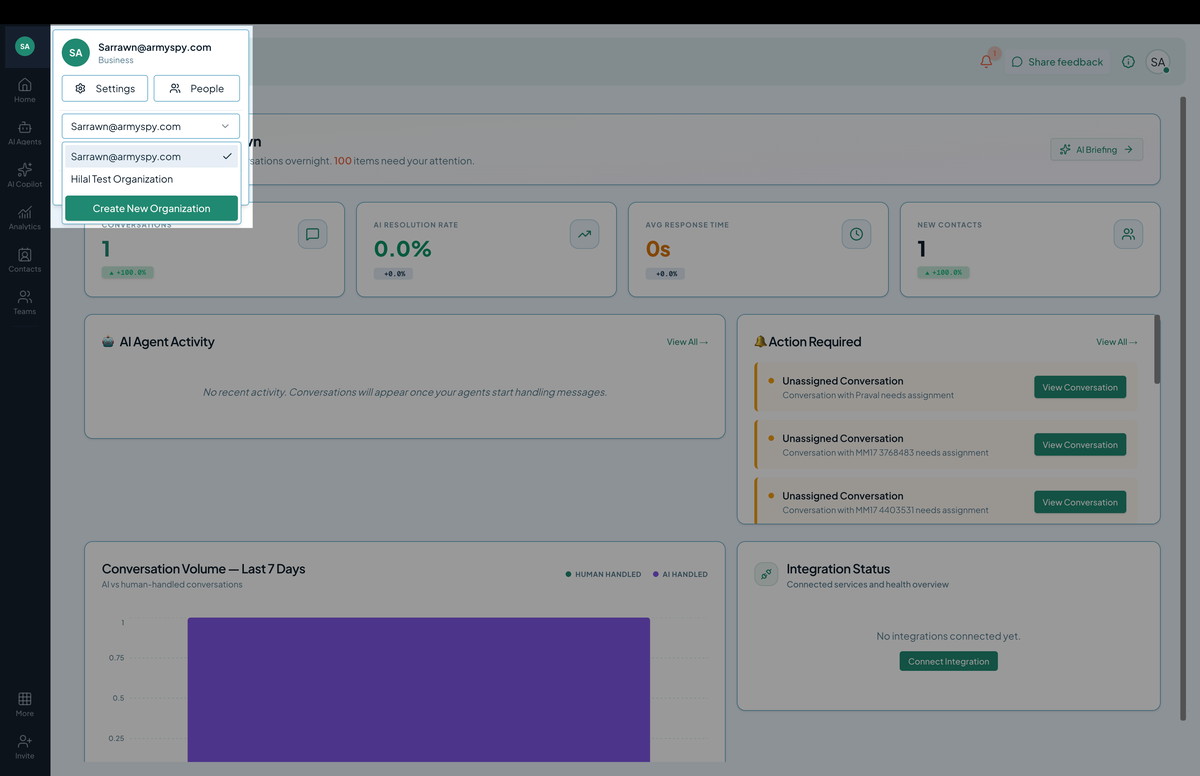 Screenshot: The organization switcher dropdown showing multiple organizations.
You see:
- A list of organizations you belong to.
- The currently selected one (checkmark).
- An option to Create new organization.
Step 2: Switch
Click any organization in the list. The page reloads to that organization’s context — chatbots, members, billing, and integrations are now from that org.
The org choice persists across browser tabs and refreshes; you only re-pick when you actively switch.
When to use multiple organizations
- Agency: one org per client. Keeps client data separated; client billing stays separate.
- Multi-brand company: one org per brand. Different chatbots, different visual identities, different teams.
- Test and prod: one org for staging, one for production. Connectors, deployment tokens, and quotas don’t cross.
- Personal vs. work: keep your hobbyist chatbot on a personal org separate from your employer.
Step 3: Create a new organization
In the org switcher, click Create new organization. Fill in:
- Name
- Plan (or stay on free trial)
- (optional) Initial members
You become the Owner of the new org. The old one is unaffected.
Step 4: Leave an organization
If you no longer need access to an org:
- Switch into that org.
- Settings → Members → find yourself → Leave organization.
- Confirm.
Caveats:
- The org’s last Owner can’t leave. Promote someone else first.
- You lose access to all data in that org. Export anything you need first.
You can re-join later via a fresh invitation.
Data isolation
Each organization is its own silo:
- Chatbots, knowledge sources, conversations, contacts, analytics, integrations, billing — all scoped per org.
- Members in Org A cannot see anything in Org B unless they’re also in Org B.
- API tokens and deployment tokens are org-scoped — leaks don’t cross orgs.
This makes agency / multi-tenant use safe by default.
Tips
- Name organizations carefully. “Acme Inc” and “Acme Marketing” are easy to confuse in the switcher.
- Use color or emoji prefixes in org names to differentiate at a glance: “🏢 Acme Inc”, “🛒 Beta Store”, “🎨 Test Org”.
- Keep an audit trail. Know who creates orgs and when — a runaway org-creation pattern can mean abuse.