Inventory Overview
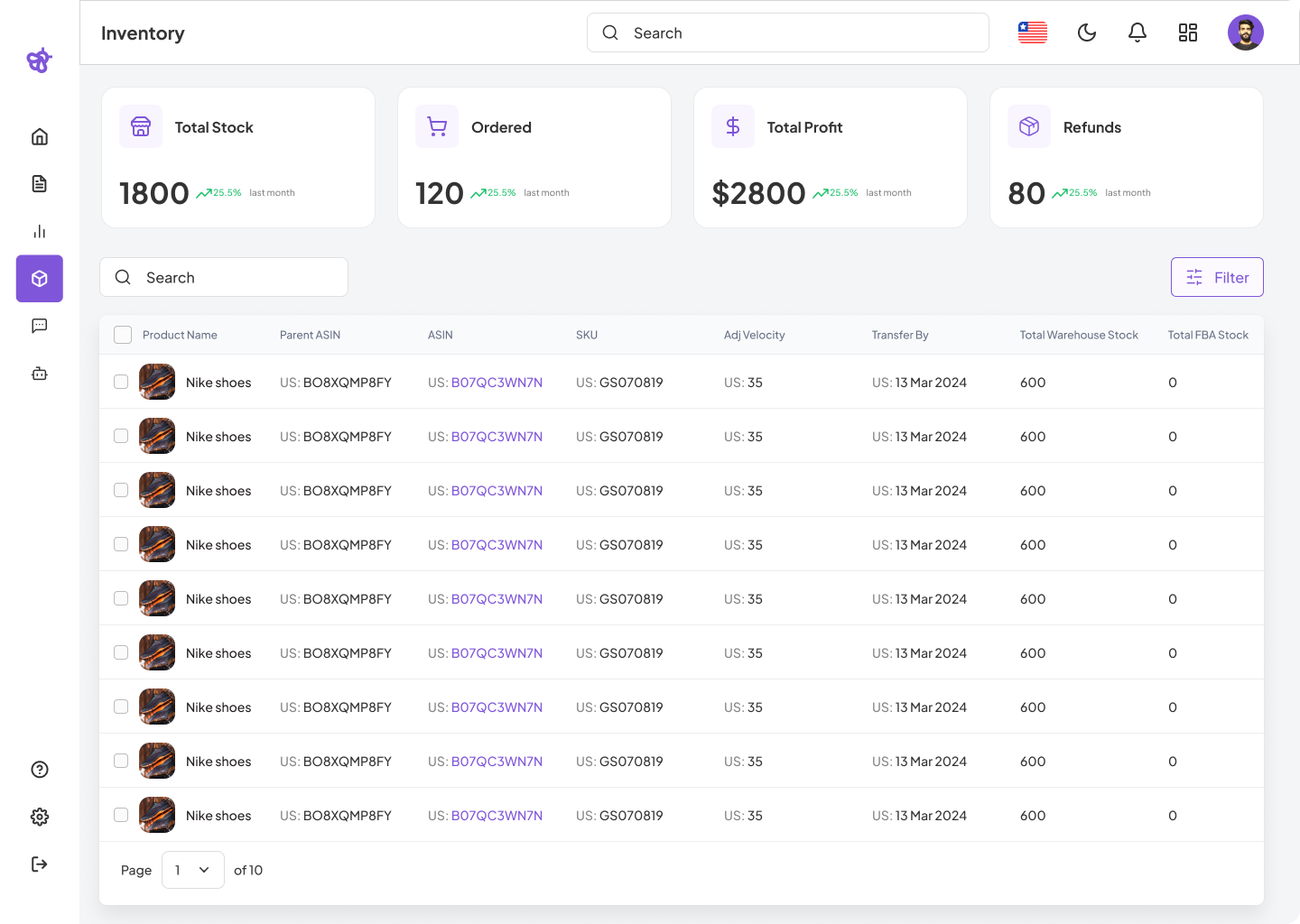
This dashboard provides a high-level summary and detailed product-level insights into inventory performance, stock availability, and financial metrics. It serves as a central hub for daily inventory management and operational decision-making.
Key Features
Summary Metrics Panel
| Metric | Description |
|---|---|
| Total Stock | Total number of units in inventory. Includes a trend indicator from previous month. |
| Ordered | Number of units currently on order, with trend analysis. |
| Total Profit | Summarized revenue generated from sales, with comparative monthly trend. |
| Refunds | Total refund count and trend, helping assess customer satisfaction and returns rate. |
Product Table
Each product row offers detailed tracking metrics:
| Column | Description |
|---|---|
| Product Name | Name and image of the product for visual identification. |
| Parent ASIN | Parent Amazon Standard Identification Number. |
| ASIN | Individual product ASIN on Amazon. |
| SKU | Internal Stock Keeping Unit used for warehouse and system tracking. |
| Adj Velocity | Adjusted sales velocity accounting for external factors (seasonality, etc.). |
| Transfer By | Deadline to transfer inventory to avoid stockouts. |
| Total Warehouse Stock | Stock currently held in internal warehouses. |
| Total FBA Stock | Stock held at Amazon fulfillment centers. |
Search and Filter
- Search Bar: Instantly look up products by name, SKU, or ASIN.
- Filters Button: Enables sorting by stock status, velocity, fulfillment method, and more.
Inventory, operations, and sales teams utilize this dashboard to:
- Monitor key performance indicators (KPIs) related to stock and profits.
- Analyze which products require replenishment or transfer.
- Balance inventory between internal warehouses and Amazon (FBA).
- Stay on top of fast-moving items or identify overstocked products.
The Inventory Overview screen consolidates inventory insights into a single, actionable dashboard. With visual summaries and detailed tables, it empowers businesses to make informed decisions, prevent stockouts, and maximize profitability.