Inventory Management Planner
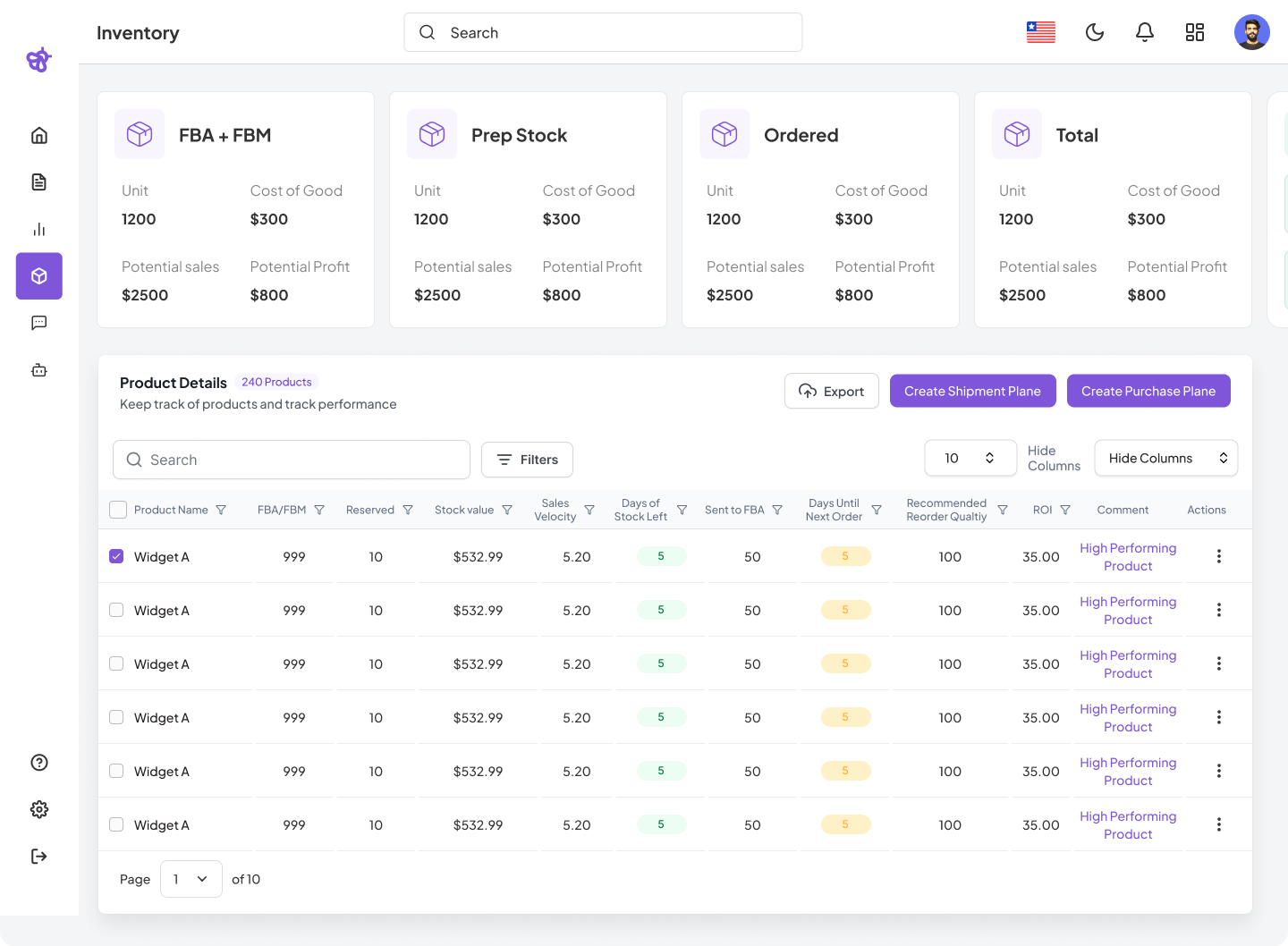
The Inventory Management Planner page is a centralized dashboard designed to help businesses efficiently track, manage, and plan their product inventory. It provides a comprehensive overview of inventory status, sales performance, and actionable insights for restocking and order management.
This page integrates essential inventory metrics, detailed product tracking, and streamlined workflows for creating shipment and purchase plans.
Key Features
Summary Cards
These four summary cards present a snapshot of key inventory metrics:
| Card | Description |
|---|---|
| FBA + FBM | Displays total units available for Fulfillment by Amazon (FBA) and Fulfillment by Merchant (FBM), along with cost of goods, potential sales, and profit. |
| Prep Stock | Shows units currently in preparation with associated costs, potential sales, and profit. |
| Ordered | Indicates units that have been ordered but not yet received, with cost, sales, and profit estimates. |
| Total | Aggregates inventory data across FBA, FBM, Prep Stock, and Ordered categories with all key financial metrics. |
Each card includes the following metrics:
- Unit: Total number of units in that category.
- Cost of Good: Total cost of those units.
- Potential Sales: Estimated revenue if all units are sold.
- Potential Profit: Estimated profit from selling all units.
Product Details Table
Located below the summary cards, this table provides detailed tracking of each product.
| Column Name | Description |
|---|---|
| Product Name | Name of the product. |
| FBA/FBM | Units allocated to FBA or FBM. |
| Reserved | Units reserved and not available for sale. |
| Stock Value | Monetary value of current stock. |
| Sales Velocity | Rate of sales per time period. |
| Days of Stock Left | Estimated days before stock depletion. |
| Sent to FBA | Units sent to Amazon FBA warehouses. |
| Days Until Next Order | Time remaining until the next recommended reorder. |
| Recommended Reorder Quantity | Suggested reorder quantity to maintain inventory. |
| ROI | Return on Investment percentage. |
| Comment | Notes or performance indicators. |
| Actions | Menu for editing or deleting entries. |
Additional Table Features:
- Search & Filters: Locate products quickly using search bar or filters.
- Bulk Actions: Apply actions to multiple products simultaneously.
- Pagination: Navigate through multiple product pages.
- Export: Download table data for external use.
Action Buttons
- Export: Export the product details table.
- Create Shipment Plan: Launch the shipment planning workflow.
- Create Purchase Plan: Start creating a purchase order for restocking.
With its comprehensive summary cards, detailed product tracking, and integrated action tools, the planner empowers businesses to make informed decisions and streamline their fulfillment operations. Whether you’re managing day-to-day inventory or planning for large-scale restocks, this page serves as the command center for all your inventory needs.
For detailed instructions on creating shipments or purchase orders, refer to the dedicated guides above.